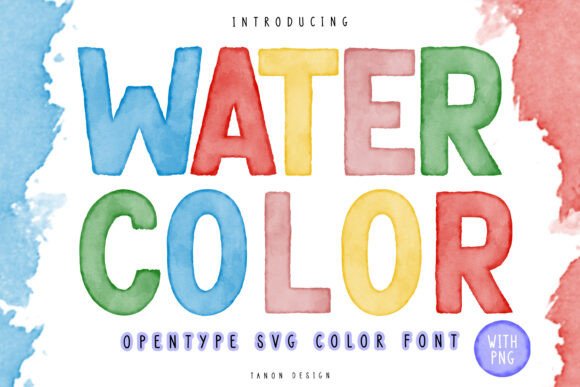
Watercolor: A Realistic Texture Brush Stroke Font
Finding a typeface that genuinely feels handcrafted can be a game-changer for your design projects. We’ve all seen fonts labeled as "handmade" that still look a bit too digital, a bit too perfect. The Watercolor font, however, is different. It’s an OpenType SVG Color font that uses realistic watercolor texture brush strokes to create letters that look like they were just painted onto the page. This isn't just a font; it's a design asset that brings an authentic, artistic touch to your work.
The Look and Feel: Authentic, Artistic, and Versatile
The primary appeal of the Watercolor font is its incredible realism. Each letterform is built from high-resolution scans of actual paint strokes, capturing the subtle variations in color, opacity, and texture you’d see with real watercolors. You'll notice the way the "paint" bleeds slightly at the edges, the gentle shifts in tone, and the way the texture of the paper seems to show through. This gives the font a warm, organic personality that’s perfect for projects aiming for a natural, handmade, or artisanal feel.
Because it's an SVG (Scalable Vector Graphics) font, all that rich texture is embedded directly into the font file. This means you don't have to layer effects or textures manually. When you type, you get the full, vibrant watercolor effect instantly. The font’s style is inherently expressive, making it a fantastic choice for display purposes where you want to capture attention and evoke a specific emotion. It’s a creative font that feels both professional and deeply personal.
Where This Watercolor Font Truly Shines
Think about projects where a personal, human touch is essential. This is where the Watercolor typeface excels. It’s a natural fit for wedding invitations, greeting cards, and event posters where an elegant, handcrafted aesthetic is desired. For entrepreneurs and small business owners building a brand identity, this font can be a cornerstone for logos, packaging design, and social media graphics, especially for brands in the wellness, food, or artisanal goods space. It instantly communicates quality and care.
In the digital realm, it’s a powerful tool for bloggers and content creators. Use it for blog post titles, Pinterest graphics, or YouTube thumbnails to make your content stand out in a crowded feed. It’s also an excellent choice for editorial design, like magazine headlines or chapter titles in a book, adding a layer of visual interest that a standard serif font or sans serif font can't provide. For crafters, the applications are endless—from custom t-shirt designs and mug prints to digital planners and scrapbooking elements.
Practical Guidance for Using the Font
While the Watercolor font is visually stunning, using it effectively requires a bit of strategy. As a premium font with a strong personality, it’s best used for headlines, logos, and short bursts of text. Its detailed texture means it’s not ideal for long paragraphs, where readability would suffer. Always pair it with a simpler, cleaner font for body copy. A classic serif font or a modern sans serif font can provide a beautiful contrast, allowing the Watercolor display font to be the star of the show without overwhelming the viewer.
Before you commit to a design, it’s wise to test how the font interacts with your background. One of the best features of this particular Watercolor font is its ability to blend. Because the letterforms have varying levels of transparency, placing them over a textured background—like a subtle paper grain or a watercolor wash—can create a seamless, integrated look. The text will appear to be part of the background itself, a sophisticated effect that’s difficult to achieve otherwise.
When you purchase this font, you’re getting more than just the OpenType SVG file. The package includes five sets of Color PNG Transparent files. These are high-resolution (1200 px) individual letters and words that you can use in any software, even if it doesn't support advanced font features like Photoshop CC 2017+ or Illustrator CC 2018+. This makes the design assets incredibly versatile. You can drag and drop the PNGs into Canva, Procreate, or any other design tool, giving everyone the ability to use these beautiful watercolor elements in their projects. Always be sure to check the commercial font license to ensure it fits your intended use, whether for personal crafts or client work.